


Hardening the Admin Plane After a Credential Leak
Hardening the Admin Plane After a Credential Leak

When a vendor disclosure points to credential exposure, the real problem is rarely only the edge device. The bigger issue is the management plane around it: who can reach it, which credentials still work, what the logs can prove, and how quickly the team can restore trust if something looks wrong.
That is why this kind of alert should be treated as a governance event as much as a patch event. If the admin side is weak, an attacker does not need a flashy exploit. They need a path into the control surface. Once that happens, the organization is dealing with configuration changes, credential rotation, and incident review at the same time.
For APAC teams, the pressure is even higher because many environments are distributed across countries, vendors, and legacy access patterns. A control that looks small in one office can become the weak link across a regional estate. The right response is to shrink the management plane first, then confirm who still has access, and only then decide what needs to be rebuilt.
Start by shrinking the management surface
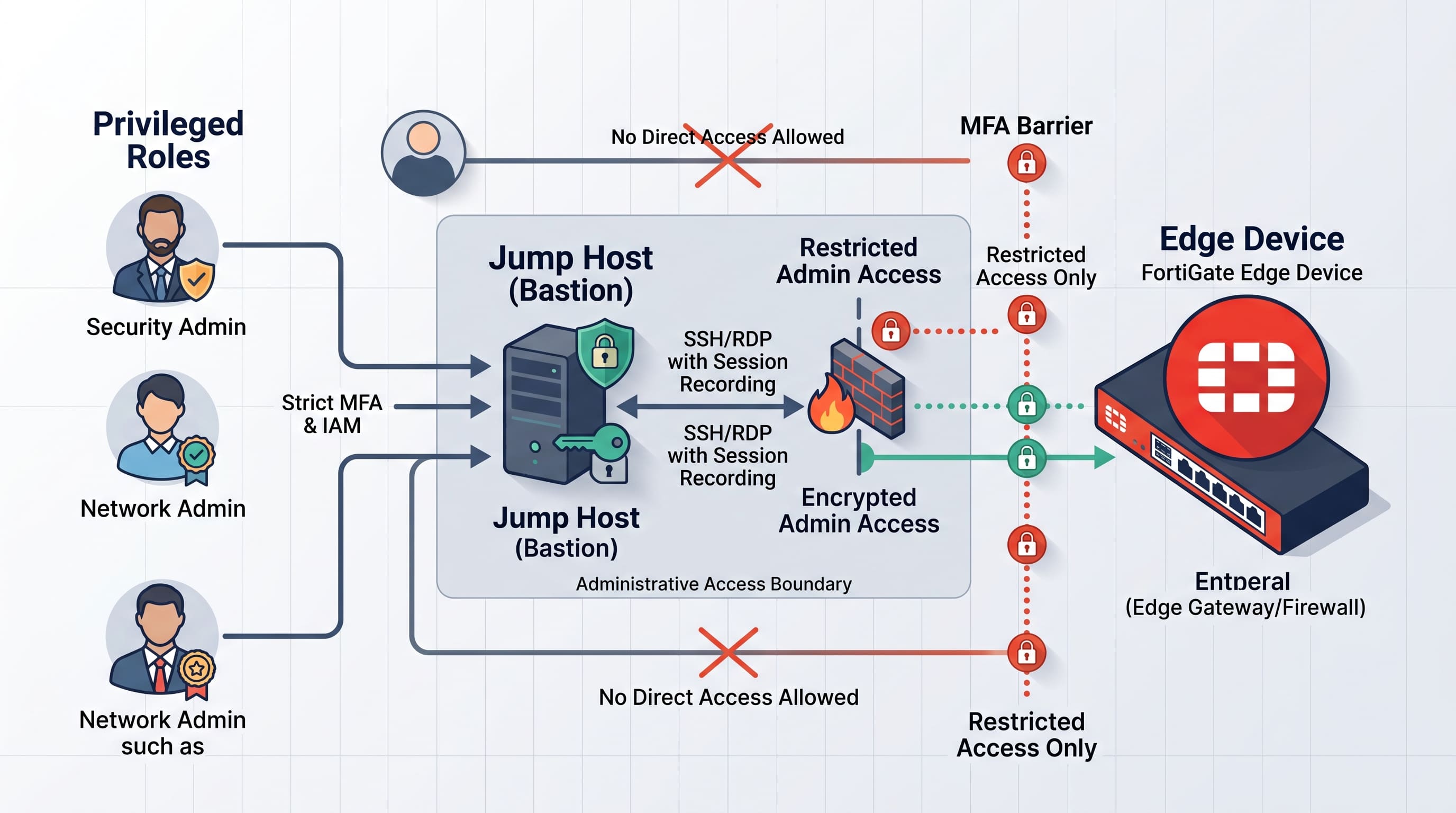
The first hardening step is to ask a blunt question: why is the admin path reachable from where it is reachable? Too many environments leave management interfaces visible to broad internal networks, remote users, or old jump hosts that were never reviewed again after deployment. That is convenient until exposed credentials turn the management plane into the easiest place to attack.
The fix is usually not exotic. Restrict who can reach the interface. Put admin access behind stronger network boundaries. Remove unnecessary exposure. Upgrading to an isolated VPS Hosting environment, for example, provides dedicated resources and greater control over network security policies compared to shared infrastructures.
Rotate credentials and kill shared admin habits
Credential exposure only matters if the credentials remain useful. That means password rotation is not optional. API keys, local admin accounts, service credentials, and shared operational logins should be reviewed quickly. If multiple people use the same account, the organization has a visibility problem as well as a security problem.
A practical checklist is simple:
- Revoke or rotate any credential that may have been exposed.
- Replace shared admin access with named accounts.
- Verify whether third-party support accounts are still needed.
- Make sure emergency accounts are recorded, monitored, and limited.
Put MFA and privilege boundaries in front
If the management plane can be reached with only a password, it is too soft for today's threat model. MFA should sit on top of the strongest possible admin entry point. Privileged access should be segmented from normal user access. Furthermore, ensuring that all administrative traffic is encrypted in transit by deploying a trusted SSL Certificate is essential to prevent man-in-the-middle credential interception.

Review logs and check for configuration drift
When credential exposure is suspected, the logs are part of the evidence. The team should review recent logins, failed attempts, privilege escalations, and configuration changes. If logs are missing or incomplete, that is itself a finding.
Credential issues often reveal a second problem: the configuration had already drifted. Emergency edits, temporary exceptions, and hand-made rules can all hide in edge environments for months. Once a risk alert arrives, those hidden changes become part of the investigation. The team should compare the live configuration against the expected baseline and look for changes that were never reviewed.
Make recovery repeatable
The final step is not cleanup. It is repeatable recovery. If the device needs to be rebuilt, the team should already know where the clean configuration lives, who can approve the restore, how long it takes to validate, and what the rollback path looks like if the first recovery attempt fails. A predictable infrastructure, such as Linux Shared Hosting with robust backup features, can significantly reduce the time needed to restore secure configurations.
Frequently Asked Questions
Lock down the admin side first. If the management plane is clean, the rest of the edge is much easier to trust.
Secure Your Environment Today with Premium SSL